Many healthcare providers confirm that charting and documentation takes away more of their time than actual patient care. Doctors spend nearly 50% of their workday interacting with EHR systems, often outside of patient hours. Between managing patient histories, writing SOAP notes, and handling coding for billing, your EHR system can often feel more like an obstacle than a tool.
But what if your EHR could work with you. Isn’t this interesting?
Well, to make this possible, enter RevMaxx AI. This is an AI-powered, intelligent, real-time medical scribe that integrates directly with your existing EHR system. It automates clinical documentation, streamline workflows and free up physician’s time for what matters most: caring for patients.
Let’s read this blog carefully and learn how RevMaxx AI and EHR system integration works.
Challenges of Traditional EHR Systems
Most healthcare professionals spend an average of 16 minutes per patient just on EHR Documentation. For a clinician seeing 20 patients a day, may add up to over 5 hours of screen time daily. Apart from this, these EHR systems have some other challenges, like-
- Manual note-taking errors
- Switching between screens and tools
- Inconsistent SOAP note formatting
- Lag in clinical coding and billing
- Patient dissatisfaction due to reduced facetime
All these inefficiencies not only affect the clinic’s revenue cycle but also contribute to lower patient satisfaction and higher provider stress.
RevMaxx AI: Turns EHR System into Smart Clinical Assistant
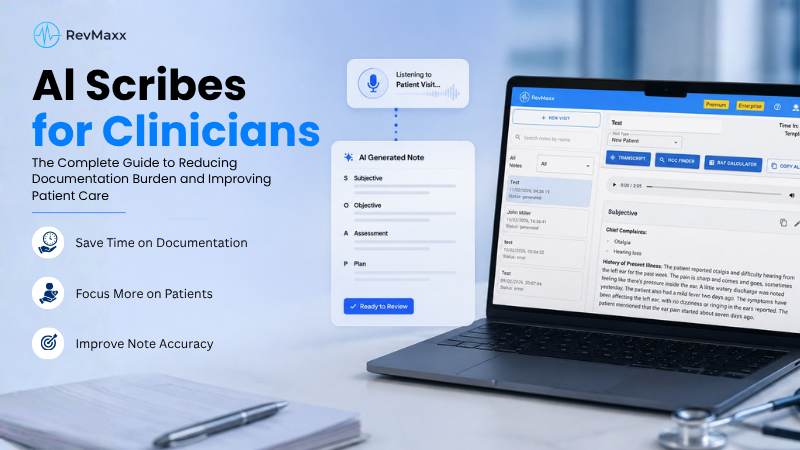
RevMaxx AI is not another EHR. This is an advanced AI Medical Scribe that listens to live doctor-patient consultations and generates structured SOAP notes automatically. Unlike traditional dictation tools, RevMaxx works in real-time and integrates directly into your existing electronic medical record systems using a lightweight Chrome Extension.
Whether you’re using Athena, Epic EHR, Tebra, or AdvancedMD, RevMaxx enhances your workflow without asking you to change platforms. It seamlessly connects via a lightweight Chrome Extension, automating up to 95% of your clinical documentation in real-time.
Here is how it enhances your clinical workflow:
- Real-time transcription during patient visits
- Auto-generated SOAP notes tailored to your specialty
- Smart ICD-10, CPT, and HCC code suggestions
- Direct integration with top EHR systems like Tebra, Epic EHR, and Athena electronic medical record
- HIPAA-compliant data processing with local encryption
Traditional Medical Scribe Vs. RevMaxx AI Scribe
Hiring human scribes can be expensive and inconsistent. RevMaxx outperforms traditional scribes by offering:
Feature | Human Scribe | RevMaxx AI Scribe |
Availability | Limited hours | 24/7 Availability |
Documentation Speed | Varies | Real-Time |
Specialty Templates | Manual Customization | Built-in Specialty Templates |
Code Suggestions | Manual Input | Auto-Suggested ICD-10, CPT, HCC |
Cost | High | Affordable Subscription |
And it does all this while keeping patient data safe with HIPAA-compliant, encrypted processing.
What Makes RevMaxx AI Stands Out?
Unlike standard dictation tools or generic scribes, RevMaxx is purpose-built to handle the complexities of modern documentation across electronic medical record systems.
Designed for All Specialties
From primary care to psychiatry, cardiology to orthopedics, RevMaxx provides:
- Specialty-specific SOAP templates
- Custom keyword recognition
- Editable phrase suggestions
- Accurate clinical context tagging
It even supports multi-specialty practices by automatically recognizing the consultation context and applying the correct documentation format.
Built-In Medical Coding Assistance
After each session, RevMaxx doesn’t stop at just note-taking. It auto-suggests proper medical billing codes, helping you:
- Avoid claim denials
- Speed up reimbursement
- Ensure compliance with billing standards
This directly enhances the revenue cycle of your clinic—without needing additional billing staff.
HIPAA-Compliant, Locally Encrypted
Security is non-negotiable. RevMaxx is designed with HIPAA-compliant data practices, ensuring:
- No third-party data sharing
- Fully encrypted local processing
- Role-based access for team members
- Complete audit trails
You can confidently integrate it into any EHR system without worrying about privacy risks.
Compatible EHR Systems Work with RevMaxx
RevMaxx AI scribe works effortlessly with some leading electronic medical record systems, including:
- Tebra (Kareo + PatientPop)
- Epic EHR
- Athena Electronic Medical Record
- AdvancedMD
- Practice Fusion
- DrChrono
- eClinicalWorks
- PointClickCare
- NextGen
- Nextech
- Qualifacts (CareLogic)
- Cerner
- AllScripts
- Verradine EHR
- Halaxy
- ClinicO
- Elation
- CureMD
- MedTech
- ChartLogic
This compatibility ensures that RevMaxx can adapt to your clinic’s unique workflow. Whether you’re in psychiatry, cardiology, family practice, or any other specialty, this RevMaxx AI Scribe and EHR integration works great.
Step-by-Step EHR Integration with RevMaxx AI
RevMaxx has simplified the integration process to ensure clinicians spend less time configuring and more time caring. Here’s how it works:
Step 1: Activate the Chrome Extension
From your EHR dashboard (e.g., Tebra, Epic, or Athena), enable the RevMaxx Chrome Extension. It takes just one click and requires no technical background.
Step 2: Start a Patient Session
Click “Start Visit” from the RevMaxx sidebar. Begin your consultation as usual, RevMaxx will automatically start ambient recording.
Step 3: Real-Time Documentation
As you speak, RevMaxx listens, transcribes, and drafts clean, structured SOAP notes in the background. No need to pause, type, or dictate separately.
Step 4: Review & Customize
After the session, review the generated note. You can edit, add context, or simply approve it. RevMaxx even suggests proper codes to ensure your documentation meets billing standards.
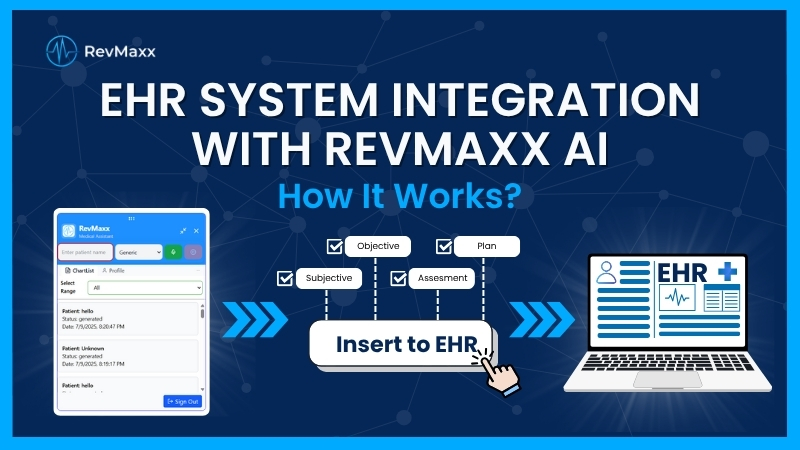
Step 5: Push the Note to EHR
With a single click, send the finalized note directly into the relevant field of your EHR system—whether it’s Tebra, Athena, or Epic. No switching tabs. No copy-pasting.
Let’s Get Started!
The EHR system empowers doctors to deliver faster, smarter, and more human-centered care. With RevMaxx AI, you get a powerful AI medical scribe that integrates seamlessly with your existing electronic medical record systems like Epic EHR or Athena electronic medical record, turning documentation into a real-time, hands-free experience.
RevMaxx is designed to work out of the box. There’s no complex onboarding or steep learning curve. All you need is: a Chrome browser, access to your EHR dashboard (e.g., Tebra, Epic, Athena), a working microphone, RevMaxx Chrome Extension. And that’s it! You’re ready to revolutionize your documentation.
Ready to transform how your practice works? Take the first step toward smarter documentation and streamlined billing with a free trial of RevMaxx.