Bring clarity and simplicity to your clinical documentation with the seamless integration of Meditech EHR and RevMaxx AI-powered scribing.
Whether you serve hospitals, behavioral health centers, or home care agencies, this combination brings faster note-taking, real-time clinical documentation, and smooth workflows—so you can focus more on care and less on paperwork.
RevMaxx AI medical scribe is now fully compatible with Meditech EHR software, helping healthcare providers document patient encounters in real time. Whether you’re in outpatient care, behavioral health, or emergency department care, RevMaxx listens to your patient visit, transcribes it instantly, and generates clean, structured SOAP notes right into your Meditech dashboard.
You don’t need to switch between apps, take notes after hours, or worry about missing important details. It all happens quietly while you focus on patient care.
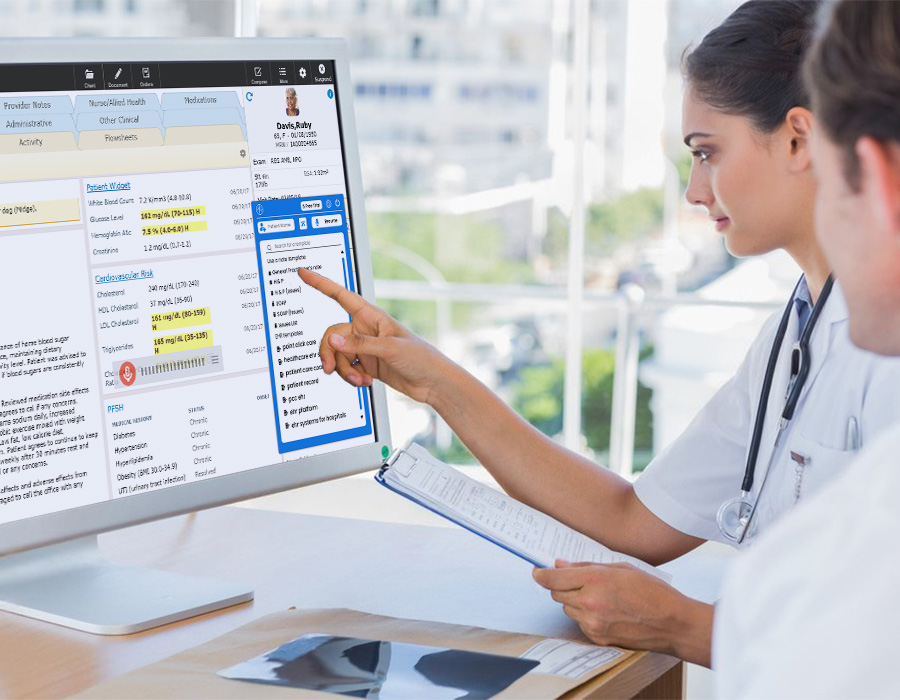
Bringing RevMaxx into your Meditech EHR system is like giving your practice a quiet, tireless assistant who never misses a word. Here’s what you get with this simple, one-click integration:
Forget typing while talking. RevMaxx listens during your consultation and transcribes it on the go. Once your visit is over, it automatically formats the content into structured notes—ready to review and save inside Meditech EHR.
No two specialties document the same way. RevMaxx provides customizable SOAP note templates for everything from psychiatry to emergency care. Whether you’re noting symptoms in a behavioral health visit or recording outcomes in a surgical follow-up, your notes stay consistent and clean.
No need to hunt for ICD-10, CPT, or HCC codes. RevMaxx reviews the clinical note and suggests the most relevant billing codes—helping you submit accurate claims faster, reduce denials, and get reimbursed on time.
Both RevMaxx and Meditech EHR are built with HIPAA compliance and patient data safety in mind. Notes are processed securely, with encryption and role-based access to ensure complete data protection.
Using RevMaxx with Meditech’s EHR system is simple and intuitive. The scribe works as a Chrome extension and integrates directly into your existing Meditech interface.
Enable the RevMaxx Chrome Extension once from your Meditech settings. After that, it’s always available—no technical setup needed.
Click “Start Visit” and begin your patient consultation as usual. RevMaxx captures the conversation without interrupting your workflow.
At the end of the visit, click “Stop Visit.” RevMaxx turns your discussion into well-structured clinical notes, using the appropriate format and language for your specialty.
Review the notes if needed. You can edit, add, or delete any section before finalizing.
With a single click, send the note directly into your Meditech EHR system, right where you need it—no copy-pasting or switching tabs.
There’s no need for complex installations or IT teams. Just add the RevMaxx Chrome Extension, toggle it on in your Meditech EHR, and start documenting smarter right away. It’s built for fast adoption and real-world usage—no learning curve required.
Whether you’re a solo practitioner or part of a large hospital network, this integration helps you reduce administrative load and deliver more consistent care.
Want to see how it works? You can try 5 free visits.
No, just install the RevMaxx Chrome Extension in your browser and toggle it inside your Meditech EHR. That’s all—no separate app or tool is needed.
Yes! Whether you’re in outpatient services, emergency department care, mental health, or home care, the integration is designed to work across all departments.
There’s no additional fee for using the Meditech integration. Just pay for your chosen RevMaxx plan and your regular Meditech EHR software subscription.
Absolutely. You have full control to tweak, edit, or expand any part of the clinical note before saving it to the patient’s record.